
1. What is a Module?
A module is a Python file (.py) containing reusable code (functions, variables, classes).
Key benefits:
- Organize related code together
- Promote code reuse
- Prevent naming conflicts
my_module.py
# my_module.py
PI = 3.14159

def circle_area(radius):
    return PI * radius ** 2

def rectangle_area(length, width):
    return length * width
Exercise 1: Create a Module
Create a module named string_utils.py with:
- A function
reverse_string(s) - A function
count_vowels(s) - Test it in another file
2. Importing Modules
1. Import Entire Module
import math
print(math.sqrt(25))
2. Import Specific Items
from math import sqrt, pi
print(sqrt(9))  # No math prefix
3. Import with Alias
import numpy as np
arr = np.array([1, 2, 3])
Exercise 2: Random Password Generator
Using the random module:
- Create a function that generates 8-character passwords
- Include uppercase, lowercase, and digits
- Use
random.choice()
3. Packages
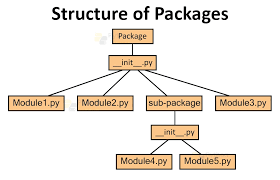
Package directory structure
Package Structure Example:
my_package/
├── __init__.py
├── module1.py
└── subpackage/
    ├── __init__.py
    └── module2.py
Importing from packages:
from my_package import module1
from my_package.subpackage import module2
Exercise 3: Create a Package
Create a package named shapes with:
- Module
circle.pywith area/circumference functions - Module
rectangle.pywith area/perimeter functions - Import and test the package
4. Python Standard Library
| Module | Purpose | Example Use |
|---|---|---|
os |
Operating system interactions | os.listdir() |
datetime |
Date/time handling | datetime.now() |
json |
JSON data handling | json.loads() |
sys |
System-specific parameters | sys.argv |
Exercise 4: File Organizer
Using the os module:
- List all files in current directory
- Print only
.txtfiles - Print file sizes